A CDN and cache warming solve two different problems: the CDN brings cached content closer to your visitors, while cache warming makes sure that cache actually holds your pages before anyone asks for them. A CDN without warming still serves a slow, cold response to the first visitor at every edge location. Here's how the two work together, and why sites relying on Cloudflare alone keep seeing cold-cache misses.
What a CDN actually does
Cloudflare, Bunny, KeyCDN, and similar services cache your content at geographically distributed edge nodes. When a visitor in Tokyo requests your Paris-hosted site, Cloudflare serves the cached response from a Tokyo data center instead of routing the request across the globe.
This is enormously valuable. A CDN reduces latency, offloads origin traffic, and improves Core Web Vitals scores for international visitors. It's one of the highest-ROI infrastructure decisions a website can make.
But a CDN is a passive cache: it only caches a page after someone has requested it.
The CDN cold cache problem
When your CDN cache is empty (after a deployment, a cache purge, or simply because a page hasn't been requested recently), the first request to each edge node is a cache miss. The request passes through to your origin server, which generates the page from scratch.
For a site using Cloudflare:
- Your deploy triggers a cache purge
- A visitor in New York requests your homepage
- Cloudflare's New York edge node has no cached version
- The request hits your origin server in Paris (latency: ~80ms just for the round trip)
- The origin generates the page (PHP, database queries, template rendering): another 200–800ms
- Cloudflare caches the response at the New York edge
- The next New York visitor gets the cached version in ~10ms
That first visitor in step 2 paid the full origin cost. And if you have 5 popular edge nodes (New York, London, Singapore, São Paulo, Sydney), the first visitor at each of those nodes gets a slow response, even after your New York cache is warm.
Cache warming fills the CDN before visitors arrive
Cache warming solves this by being that "first visitor", deliberately, before real traffic arrives.
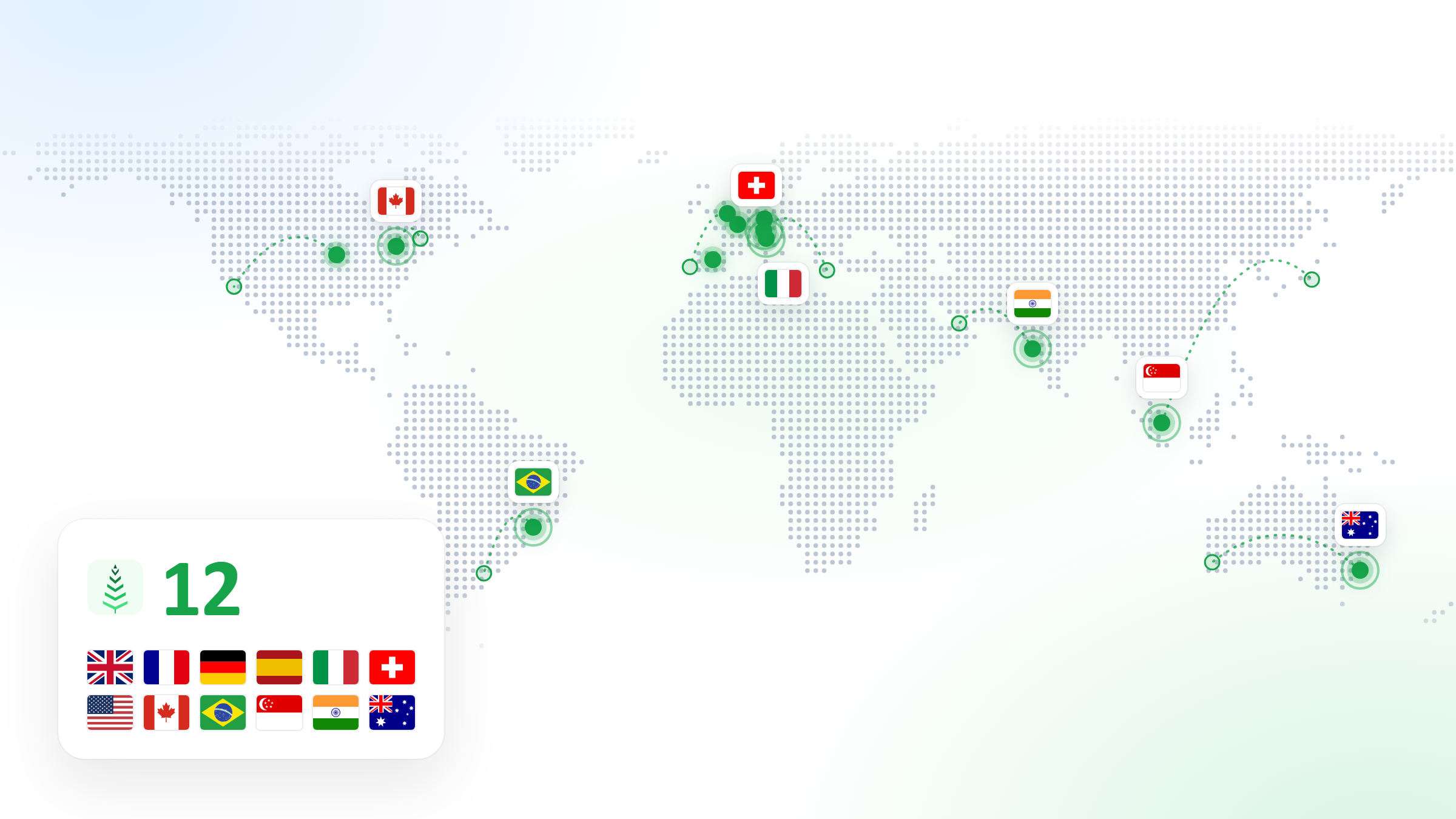
CacheBoost can warm your cache from multiple geographic regions simultaneously. When you configure warming from France, the USA, Germany, Spain and the UK, you're pre-populating the CDN edge nodes closest to each of those regions. By the time real visitors arrive, their nearest edge node already has a warm copy.
Deploy → CDN purge → CacheBoost warms from FR, US, DE, ES, UK
                     ↓
              CDN edges FR, US, DE, ES, UK now have warm cache
                     ↓
              All visitors in those regions get fast responses
What CDN caching and origin caching have in common
The same principle applies to origin-side caching: Varnish, nginx proxy_cache, Redis page cache, or WordPress cache plugins like WP Rocket and LiteSpeed Cache.
These caches live on or near your origin server. A CDN in front of them doesn't eliminate the need for origin warming: it just adds another caching layer that also needs to be warm.
In a typical production stack:
Visitor → CDN (Cloudflare) → Origin cache (Varnish/WP Rocket) → Application (PHP/WordPress)Both the CDN layer and the origin layer can be cold after a flush. CacheBoost warms both simultaneously: the HTTP request it sends populates the origin cache, and the CDN caches the response as it passes through.
The one case where a CDN alone is "enough"
If your content almost never changes and you use a very long CDN TTL (days or weeks), the CDN cold cache window is small enough to be acceptable. A static marketing site with a 7-day CDN TTL will have cold edges only after a deployment, which happens rarely.
For dynamic sites (e-commerce, news, SaaS dashboards, WordPress blogs with frequent publishing), the cache is flushed regularly, and the cold window happens often enough to matter for both user experience and SEO.
Practical setup: Cloudflare + CacheBoost
- Set up Cloudflare with appropriate Cache Rules for your dynamic pages
- Create a CacheBoost boost pointing at your sitemap, with regions matching your primary user geographies
- Trigger warming on deploy via the CacheBoost API from your deploy pipeline
- Schedule nightly warming as a fallback for TTL-based cache expirations
With this setup, your CDN edges are pre-populated before visitors arrive, your origin cache is warm, and your Core Web Vitals stay consistent regardless of when your last deployment or content update happened.